Firewall Basics for SMBs:
What You Need (and What You Don’t)
A plain-English guide to understanding, maintaining, and actually getting value from your firewall, without a computer science degree.

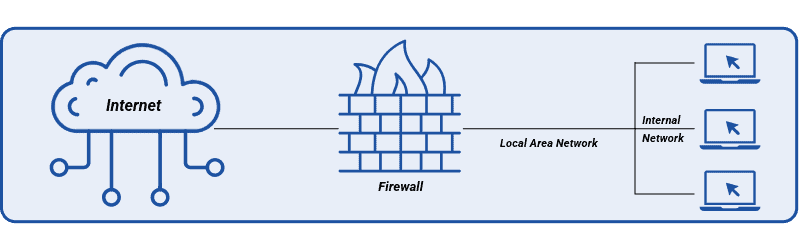
Here’s a scenario that might sound familiar. You signed up for Microsoft 365, your IT person set up a router when you moved into the office, and you haven’t thought much about either since. Things work. Nobody has called to report a problem. That must mean you’re covered, right?
Not quite. The quiet assumption that cloud tools or a basic router are “good enough” for security is one of the most common and costly things we see at SBT Partners. And you’re not alone in making it. Most small business owners are not ignoring security on purpose. They just were never handed a clear explanation of what a firewall actually does, or what happens when it’s misconfigured, outdated, or simply the wrong tool for the job.
This post isn’t going to scare you. It’s going to give you a clear, honest picture of what a firewall is, what it isn’t, the mistakes most SMBs quietly make, and how to know whether yours is actually working for you. By the end, you’ll have enough context to have a confident conversation with your IT partner about whether your setup is solid or overdue for a look.
SECTION 01
Think of a firewall as the bouncer at the door of your business network. Every piece of data trying to come in or go out has to pass through. If it’s on the approved list, it gets through. If it looks suspicious, or matches a known threat, it gets turned away before it ever reaches your systems or your team.
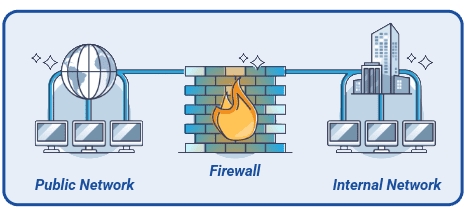
That’s the simple version. Here’s what it looks like in practice:
That last point is worth pausing on. A firewall from ten years ago was mostly a wall with rules. A current business firewall is closer to an intelligent filter that learns, updates, and adapts. That’s why a well-configured firewall can quietly do the work of several separate security tools, and why getting it right matters more than most people realize.
SECTION 02
Firewalls are exceptionally good at network-level protection. They stop unauthorized access attempts, block known malicious traffic, and can segment your network so that if one area is compromised, the damage doesn’t automatically spread to everything else. For threats that arrive via direct network connection, a properly configured firewall is one of your strongest defenses.
Firewalls don’t read your email. They cannot stop an employee from clicking a convincing phishing link that arrives in their inbox, and they will not catch a stolen password being used to log in legitimately. If an attacker gets credentials and uses them to access a cloud app from a normal browser, the firewall sees that as regular traffic. This is not a flaw; it’s just a boundary. Understanding it helps you build the right layers around it.
If the inbox is a concern (and it should be), our post on How Modern Phishing Bypasses Traditional Email Filters is a good companion read. Firewalls and email security solve different problems, and understanding the gap between them is the first step to closing it.
SECTION 03
Here’s something worth knowing: most firewall failures are not caused by sophisticated hackers. They are caused by neglect, wrong assumptions, and the quiet belief that because nothing has gone wrong yet, everything must be fine.
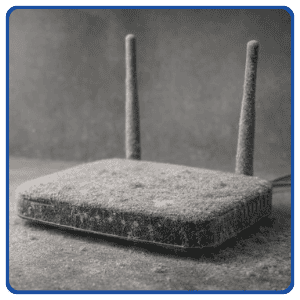
The mistakes we see most often at SBT Partners aren’t dramatic. They’re practical, avoidable, and almost always fixable once someone actually looks:
The last point is one we address directly in Why Proactive IT Support Is the Future of Managed Partnerships. There is a meaningful difference between a one-time setup and ongoing management, and that gap is exactly where most security issues take root.
SECTION 04
Think about how much your business network has changed in the last three years. New laptops. Some people working from home. A cloud storage tool someone signed up for. Maybe a VoIP phone system, a second location, or a few contractors accessing things remotely. None of that was there when your firewall was originally configured.
A firewall configured in 2021 was built for a 2021 network. It does not automatically adapt when your team doubles, your tools change, or your employees start connecting from coffee shops. The rules stay the same even as everything else moves. And that gap, between what the firewall was set up to handle and what your network actually looks like today, is exactly where attackers look for an opening.
The other side of this is updates. Firewall vendors regularly release firmware patches that address newly discovered vulnerabilities. A firewall that has not been updated is not sitting still, it is actively falling behind. Attackers know which vulnerabilities exist in which firmware versions. That information is publicly available. The question is whether your firewall has been patched before someone decides to try it.
The most useful way to think about it: a firewall is not a smoke detector you install and forget. It is more like a car. It needs regular check-ins to keep doing its job well, and the longer you skip them, the more likely something important gets missed.
This is the core argument behind Beyond IT: How MSPs Accelerate Business Growth. Continuous oversight is what turns a good firewall into an effective one. One-time installs are a starting point, not a finish line.
SECTION 05
You do not need to be a network engineer to spot the warning signs. The table below gives you a plain-English guide to knowing when a review is overdue and when it is time to start fresh. If more than one of these rows sounds familiar, it is probably worth a conversation with your IT partner sooner rather than later.
| What you are noticing | What it probably signals | Suggested next step |
|---|---|---|
| Your team has grown or moved to hybrid work | Firewall rules and capacity may no longer match how people actually work | Schedule a configuration review |
| Internet speeds upgraded but the network still feels slow | The firewall hardware may be the bottleneck, not the connection | Compare firewall throughput specs to your current plan |
| No firmware updates in over a year | Known vulnerabilities are going unpatched, and attackers know it | Check vendor support status and patch immediately |
| Frequent VPN complaints or random disconnects | Hardware may be underpowered for current remote access load | Review capacity and remote access configuration |
| The firewall hardware is more than 5 years old | Likely approaching or past end of vendor support entirely | Plan for replacement, not just a patch |
| Nobody on your team knows when it was last reviewed | There is probably no active monitoring in place at all | Start with a basic IT health check to establish a baseline |
As a general guideline, most SMB firewalls have a practical lifespan of three to five years. Growth, remote work, and rising internet speeds all shorten that window. If yours is approaching that age and has not been reviewed since it was installed, that is a reasonable place to start.
SECTION 06
Here is some reassurance before we close out: you do not need a Fortune 500 security stack. You do not need the most expensive firewall on the market. You need something reliable, properly configured, and actively maintained by someone who actually knows what to look for. The right firewall is not the most feature-packed one. It is the one that fits your size, your team, and the way you actually work.
For most SMBs, that looks like this:
CLOSING THOUGHTS

Most SMBs do not have a firewall problem because they lack tools. They have one because the tools they have were set up once, left alone, and quietly stopped keeping up with how the business actually operates.
If you’re not sure whether your current setup is working for you or just sitting there looking busy, that is exactly the kind of question a free IT health check is designed to answer. No pressure, no jargon, just a straight look at what you have and whether it is doing its job.
The good news is that this is genuinely fixable. You do not need more layers of software or a bigger budget. You need the right firewall, configured for how you work today, with someone paying attention to it on a regular basis. That combination, more than any specific product, is what makes a firewall actually effective.

We offer a free IT health check for SMBs. Straight answers, no sales pitch, just a clear picture of where things stand.
 https://www.sbtpartners.com/wp-content/uploads/2026/09/Designer-43.jpg
1024
1536
[email protected]
/wp-content/uploads/2023/11/SBT-Logo-Color_a3b47f75244ae0f19b0c6e42706a26e8-1.png
[email protected]2026-09-10 14:06:352026-09-10 15:32:10What Industries Are the Most Vulnerable to Cyber Attacks?
https://www.sbtpartners.com/wp-content/uploads/2026/09/Designer-43.jpg
1024
1536
[email protected]
/wp-content/uploads/2023/11/SBT-Logo-Color_a3b47f75244ae0f19b0c6e42706a26e8-1.png
[email protected]2026-09-10 14:06:352026-09-10 15:32:10What Industries Are the Most Vulnerable to Cyber Attacks? https://www.sbtpartners.com/wp-content/uploads/2026/08/Designer-39.png
1024
1536
[email protected]
/wp-content/uploads/2023/11/SBT-Logo-Color_a3b47f75244ae0f19b0c6e42706a26e8-1.png
[email protected]2026-08-20 14:40:402026-08-20 14:41:42The Real Cost of a Data Breach for a Small Business
https://www.sbtpartners.com/wp-content/uploads/2026/08/Designer-39.png
1024
1536
[email protected]
/wp-content/uploads/2023/11/SBT-Logo-Color_a3b47f75244ae0f19b0c6e42706a26e8-1.png
[email protected]2026-08-20 14:40:402026-08-20 14:41:42The Real Cost of a Data Breach for a Small Business https://www.sbtpartners.com/wp-content/uploads/2026/08/1726750210_img-darkweb.webp
613
871
[email protected]
/wp-content/uploads/2023/11/SBT-Logo-Color_a3b47f75244ae0f19b0c6e42706a26e8-1.png
[email protected]2026-08-12 14:20:132026-08-14 20:52:58The Dark Web: One Leaked Password Is All It Takes
https://www.sbtpartners.com/wp-content/uploads/2026/08/1726750210_img-darkweb.webp
613
871
[email protected]
/wp-content/uploads/2023/11/SBT-Logo-Color_a3b47f75244ae0f19b0c6e42706a26e8-1.png
[email protected]2026-08-12 14:20:132026-08-14 20:52:58The Dark Web: One Leaked Password Is All It Takes https://www.sbtpartners.com/wp-content/uploads/2026/04/GettyImages-1348795158-cyber-security.webp
194
345
[email protected]
/wp-content/uploads/2023/11/SBT-Logo-Color_a3b47f75244ae0f19b0c6e42706a26e8-1.png
[email protected]2026-04-23 10:55:062026-07-14 13:59:22You Have Security Tools. But Do You Have a Security Plan?
https://www.sbtpartners.com/wp-content/uploads/2026/04/GettyImages-1348795158-cyber-security.webp
194
345
[email protected]
/wp-content/uploads/2023/11/SBT-Logo-Color_a3b47f75244ae0f19b0c6e42706a26e8-1.png
[email protected]2026-04-23 10:55:062026-07-14 13:59:22You Have Security Tools. But Do You Have a Security Plan? https://www.sbtpartners.com/wp-content/uploads/2026/04/Phishing.jpg
485
913
[email protected]
/wp-content/uploads/2023/11/SBT-Logo-Color_a3b47f75244ae0f19b0c6e42706a26e8-1.png
[email protected]2026-04-02 16:16:462026-07-12 13:58:37How Modern Phishing Bypasses Traditional Email Filters
https://www.sbtpartners.com/wp-content/uploads/2026/04/Phishing.jpg
485
913
[email protected]
/wp-content/uploads/2023/11/SBT-Logo-Color_a3b47f75244ae0f19b0c6e42706a26e8-1.png
[email protected]2026-04-02 16:16:462026-07-12 13:58:37How Modern Phishing Bypasses Traditional Email Filters https://www.sbtpartners.com/wp-content/uploads/2026/03/ios.png
907
1617
[email protected]
/wp-content/uploads/2023/11/SBT-Logo-Color_a3b47f75244ae0f19b0c6e42706a26e8-1.png
[email protected]2026-03-26 10:50:422026-07-12 13:58:37Why iPhone Updates Matter More Than Ever
https://www.sbtpartners.com/wp-content/uploads/2026/03/ios.png
907
1617
[email protected]
/wp-content/uploads/2023/11/SBT-Logo-Color_a3b47f75244ae0f19b0c6e42706a26e8-1.png
[email protected]2026-03-26 10:50:422026-07-12 13:58:37Why iPhone Updates Matter More Than Ever https://www.sbtpartners.com/wp-content/uploads/2026/02/Untitled-29.png
1080
1080
[email protected]
/wp-content/uploads/2023/11/SBT-Logo-Color_a3b47f75244ae0f19b0c6e42706a26e8-1.png
[email protected]2026-02-27 09:50:252026-07-12 13:58:40The SMB Owner’s Guide to Fewer Tech Headaches
https://www.sbtpartners.com/wp-content/uploads/2026/02/Untitled-29.png
1080
1080
[email protected]
/wp-content/uploads/2023/11/SBT-Logo-Color_a3b47f75244ae0f19b0c6e42706a26e8-1.png
[email protected]2026-02-27 09:50:252026-07-12 13:58:40The SMB Owner’s Guide to Fewer Tech Headaches https://www.sbtpartners.com/wp-content/uploads/2025/11/Screenshot-2025-11-14-114035-1.png
1274
1562
[email protected]
/wp-content/uploads/2023/11/SBT-Logo-Color_a3b47f75244ae0f19b0c6e42706a26e8-1.png
[email protected]2025-11-17 10:14:592026-07-12 13:58:47Cyber Hygiene in 2026
https://www.sbtpartners.com/wp-content/uploads/2025/11/Screenshot-2025-11-14-114035-1.png
1274
1562
[email protected]
/wp-content/uploads/2023/11/SBT-Logo-Color_a3b47f75244ae0f19b0c6e42706a26e8-1.png
[email protected]2025-11-17 10:14:592026-07-12 13:58:47Cyber Hygiene in 2026 https://www.sbtpartners.com/wp-content/uploads/2025/05/ReCAPTCHA-and-Malware-What-You-Need-to-Know.jpg
1250
2000
Abstrakt Marketing
/wp-content/uploads/2023/11/SBT-Logo-Color_a3b47f75244ae0f19b0c6e42706a26e8-1.png
Abstrakt Marketing2025-05-12 08:52:232026-07-12 13:58:57ReCAPTCHA and Malware: What You Need to Know
https://www.sbtpartners.com/wp-content/uploads/2025/05/ReCAPTCHA-and-Malware-What-You-Need-to-Know.jpg
1250
2000
Abstrakt Marketing
/wp-content/uploads/2023/11/SBT-Logo-Color_a3b47f75244ae0f19b0c6e42706a26e8-1.png
Abstrakt Marketing2025-05-12 08:52:232026-07-12 13:58:57ReCAPTCHA and Malware: What You Need to Know