https://www.sbtpartners.com/wp-content/uploads/2026/04/Screenshot-2026-04-10-092032.png
208
373
[email protected]
/wp-content/uploads/2023/11/SBT-Logo-Color_a3b47f75244ae0f19b0c6e42706a26e8-1.png
[email protected]2026-04-10 09:21:272026-04-13 13:58:26The Hidden Cost of Convenience in SMB ITEvery SMB has that moment when something breaks at the worst possible time; a locked account, a frozen device, a weird email nobody knows what to do with. The good news? Most of those headaches aren’t random. They’re predictable, preventable, and often avoidable with a few simple habits. Here are the five that make the biggest difference.

Why “Oh No” Moments Keep Happening to SMBs
Every small business owner knows the feeling: everything is running fine… until suddenly it isn’t. A login stops working, a system goes down, or a suspicious email prompts a frantic question: “Did we just get hacked?” These aren’t dramatic Hollywood cyberattacks, they’re preventable, everyday disruptions that drain time and momentum.
In fact, 61% of SMBs experienced at least one cyberattack last year, with phishing and credential misuse leading the list. That stat doesn’t point to “bad actors”; it highlights how normal companies face normal risks (https://gitnux.org). These small, predictable friction points are exactly what a Proactive IT Health Check mindset aims to eliminate.

And that brings us to the first habit, because the majority of “Oh No” moments start with something as simple as unclear access.
Habit #1: Standardize Access Before It Becomes Chaos
One of the fastest ways SMBs lose control of their IT environment is through inconsistent access: shared passwords, unclear account owners, and rights that stick around long after people leave. A few simple standards dramatically reduce risk:
- Centralized user and system access
- No shared or generic logins
- Clear ownership of each account
- Baseline role-based access (RBAC)
This is the same foundation we explored in our recent LinkedIn post: Best Practices for the SMB – Week 1: Standardize Access, where Microsoft’s research showed that MFA can block 99.2% of account compromise attempts. When access is clean and predictable, the rest of your tech strategy becomes easier, especially the next habit, which deals with the tools people access every day.

Habit #2: Patch, Update, and Replace Before Failure Forces Your Hand
A surprisingly common SMB belief is: “If it still turns on, it’s fine.” But aging hardware and outdated software introduce hidden cracks that slowly widen until something breaks. Here’s the hard truth: 84% of downtime incidents trace back to security issues and human error — and both usually stem from unsupported systems or old equipment (encomputers.com). Instead of waiting for failures:
- Schedule routine OS and application updates
- Track aging systems
- Plan hardware refreshes proactively
- Replace “critical friction” devices before they spark bigger issues
We break down these challenges further in 7 Tips for Building a Proactive IT Strategy That Drives Growth for Your SMB — and once your systems are healthy, you can finally focus on what happens when something does go wrong: recovery.
Habit #3: Treat Backups as a Recovery Tool, Not a Checkbox
Most businesses proudly say, “We have backups.” But ask when they last tested a restore, and the confidence fades. Backups are only valuable if recovery is reliable, especially during downtime. That’s why this stat hits hard: 34% of companies can’t fully restore data when they need it (captainpragmatic.com). A modern backup strategy includes:
- Cloud + offsite redundancy
- Routine restore tests
- A documented recovery process
- Clear responsibility for oversight
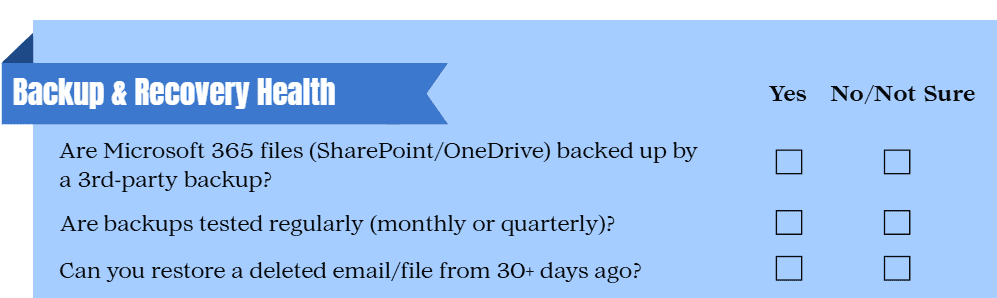
Our SMB IT Checklist dives deeper into what your backup and recovery stack should include. Once recovery is predictable, we can address the most unpredictable source of issues: people. We’ve included the backup & recovery section below; if you’d like the full checklist, reach out and we’ll send it for free!

Habit #4: Reduce Human Error With Simple, Repeatable Guardrails
Most cyber issues don’t come from sophisticated attacks, they come from a rushed click, a reused password, or a missed warning sign. That’s why guardrails matter. The biggest threats SMBs face today come from people-related risks, with phishing and credential theft responsible for ~73% of SMB breaches (ninjaone.com). Practical guardrails include:
- Short, recurring phishing awareness refreshers
- Password managers + hygiene basics
- MFA everywhere it can be enabled
- Policies written for real people, not security textbooks
We explore these threats extensively in10 of the Most Common Cybersecurity Threats And once people understand the basics, habit #5 helps ensure they never forget them.
Habit #5: Document the Boring Stuff (So It Saves You Later)
Documentation feels tedious, until the day you actually need it. Offboarding lists, vendor contacts, escalation paths, and incident procedures all shorten downtime and reduce stress.
Consider what happens when someone leaves your company: without a checklist, accounts stay open, access lingers, and confusion spreads. That’s why we always stress documentation, because small details prevent big problems. Good documentation becomes a force multiplier during incidents.

Proactive IT Is About Fewer Surprises, Not More Tools
Most SMB “Oh No” moments don’t come out of nowhere; they come from small habits that slipped through the cracks. These five habits help eliminate the majority of issues that cause stress, downtime, data loss, and after-hours emergencies. Proactive doesn’t mean more tools. It means fewer surprises.
If you want clarity about where your business stands, we offer a Free IT Health Check, a quick, low‑pressure way to see exactly which habits you have in place and which gaps could be putting you at risk. Because peace of mind starts with visibility, not obligations.

Share This Post
More Like This
https://www.sbtpartners.com/wp-content/uploads/2026/04/Screenshot-2026-04-10-092032.png
208
373
[email protected]
/wp-content/uploads/2023/11/SBT-Logo-Color_a3b47f75244ae0f19b0c6e42706a26e8-1.png
[email protected]2026-04-10 09:21:272026-04-13 13:58:26The Hidden Cost of Convenience in SMB IT
Modern IT Solutions: A Handbook for Finding a New Service Provider
Modern WorkplaceExplore six traits that define a growth-focused, modern IT solutions partner and learn warning signs you’ve outgrown your current provider.

Why a Strong IT Strategy is the Backbone of Modern Workplaces
Modern WorkplaceDiscover how a well-planned IT strategy powers productivity, protection, and growth in the modern workplace and how you can implement one here.

The SBT Solution Stack: Your Ultimate Digital Defense in 2025
Managed IT, Managed Services, Modern WorkplaceFind out how SBT’s solution stack can streamline your IT, fortify your cybersecurity posture, and transform your business into a modern workplace.

The 4 C’s of IT Modernization
Modern WorkplaceExplore the 4 C’s of IT modernization and how SBT Partners leverages them to benefit our clients.

Make a Connection When You Link Microsoft Teams to LinkedIn
Modern Workplace, Technology as a Service
Why You Should Switch to a Microsoft Teams Phone System
Cloud Solutions, Modern WorkplaceMigrating to a Microsoft Teams phone system allows your staff to communicate and collaborate effectively. Learn more about the benefits of Teams.

The Benefits of SharePoint for Your Modern Workplace
Modern WorkplaceModern workplaces thrive on streamlined digital technology, and SharePoint is an essential element. Learn more about the platform here.

Modern Workplace Series: The Benefits of Cybersecurity Compliance
Modern WorkplaceWe looked at how cybersecurity compliance and regulatory compliance are important elements of a modern workplace. Learn more here.