https://www.sbtpartners.com/wp-content/uploads/2026/02/Untitled-3-26.png
660
796
[email protected]
/wp-content/uploads/2023/11/SBT-Logo-Color_a3b47f75244ae0f19b0c6e42706a26e8-1.png
[email protected]2026-02-20 08:44:512026-04-08 13:58:30How to Build an AI Agent in 10 Minutes or Less with Microsoft CopilotTeams using Copilot style AI tools complete tasks up to 29 percent faster and reduce routine errors by 20 percent, according to Microsoft research.

What an AI Agent Really Means in Copilot
In everyday terms, an AI agent is a guided Copilot experience that behaves the same way every time. It does not improvise from scratch like a regular chat session. Instead, it follows your rules, your knowledge, and your intended workflow. This consistency is what makes agents ideal for repetitive questions, internal procedures, meeting follow up steps, or any task that must be performed the same way no matter who asks.
Small businesses often struggle to process and share knowledge across teams, and that’s exactly where agents shine. They provide structure without forcing the business to adopt custom software. This approach aligns closely with the way many smaller organizations have begun adopting AI tools for workflow improvement, a growing trend explored in SBT’s article on The Rise of AI Agents, which highlights why these guided automations are becoming foundational for day-to-day work.

Understanding what an agent does is the first step. Next you need to prepare your inputs before you begin building.
The Three Minute Setup Checklist Before You Build
Before you open Copilot’s agent builder, spend a few minutes defining three simple but important elements. This preparation ensures your agent behaves correctly from the very beginning and avoids the most common early mistakes.
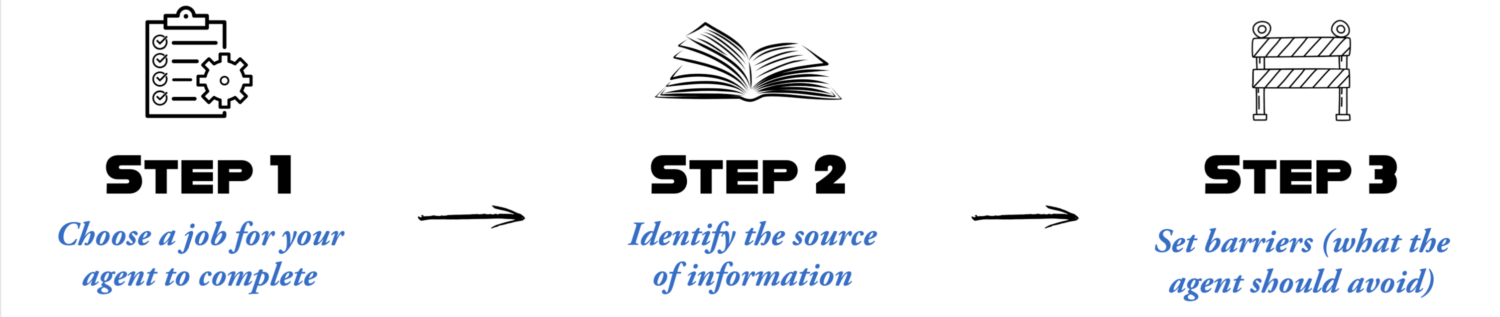
First, choose one single job. The tighter the focus, the more accurate the agent becomes. Think in terms of a single question that leads to a single outcome. Second, identify your source of truth. This should be one page; something like an SOP (standard operating procedure), or structured document that contains the exact information the agent should reference. Third, define your guardrails. Decide what the agent should avoid, when it should escalate, and which topics are completely off limits.
This kind of clarity is part of a broader shift toward deliberate, structured AI adoption in small business environments, something emphasized in SBT’s blog Copilot Business: Microsoft’s Commitment to Small Business Success, which explains how early preparation dramatically improves AI reliability.

Once you have these pieces in place, you are ready for the ten-minute build itself.
The Ten Minute Build: A Simple Agent Recipe
The actual build process is surprisingly fast when the preparation is done upfront. Below is the complete recipe, broken down minute by minute so you can follow along even if this is your first time creating an automation inside Copilot.
Minute 1 and 2: Name the agent and define the job
Pick a descriptive name that clearly states what the agent does. Examples include Copilot Readiness Helper, Password Reset Guide, or New Hire Setup Assistant. Then write a one sentence job description so the agent’s purpose is unambiguous.
Minute 3 to 5: Load the knowledge source
Upload or connect the single document your agent will rely on. Clean formatting helps Copilot interpret the information more accurately. Use headings, short paragraphs, and straightforward lists whenever possible.
Minute 6 to 7: Craft the instructions
This is the heart of the agent. Specify tone, boundaries, escalation rules, and any language constraints. For example, you might instruct the agent to remain concise, rely only on the provided document, and direct any unsupported requests to your helpdesk.
Minute 8 to 9: Run three test prompts
Use one normal request, one confusing edge case, and one request the agent should decline. If anything looks inaccurate, adjust the instructions rather than the document. Instructions are often the fastest way to correct unexpected behavior.
Minute 10: Publish and communicate the scope
Share the agent with your team and explain what it can do today. Emphasize that version one is intentionally narrow and will expand based on feedback. Once your first agent is live, the natural question becomes what to build next.
Three SMB Agent Ideas You Can Use Immediately
The simplest way to expand your agent lineup is to start with proven, high demand use cases. Across many small organizations, three agent types repeatedly deliver immediate value.
- A meeting recap agent summarizes discussions, decisions, and action items, a time saver for managers who join late or skip recurring sessions.
- An onboarding agent helps new hires get set up with accounts and required forms without depending on manual email chains.
- And a helpdesk triage agent collects symptoms and routes requests to the correct queue, reducing repetitive intake work for IT teams.

These kinds of practical, workflow centered automations reflect the broader theme of using technology to simplify the employee experience, a topic explored further in SBT’s article Why Total IT Management is The Secret Weapon for Hybrid Success, which highlights how the proper use of technology can make your employees lives easier.
After choosing your early use cases, the last step is rolling them out carefully so they enhance the workflow rather than disrupt it.
Rollout and Guardrails: So It Helps Not Hurts
A successful agent rollout requires more than publishing the tool. Begin with a clear policy that identifies approved AI tools, defines safe and sensitive data categories, and ensures employees understand what the agent is allowed to handle. Start with a pilot group that can provide quick feedback, then refine the agent before expanding across the organization.
Creating this kind of structure is easier when it aligns with your existing organizational values. A practical example of this can be found in SBT’s The SBT Way: 11 Guiding Principles That Define Our Partnership Approach, which emphasizes clarity, consistency, and quality of communication, all of which mirror the behaviors you want from your agents.
Once your policies are defined and your pilot agents are in place, you will discover how quickly your organization can scale these small but powerful automations.
Ready to Build Your First Copilot Agent?
If you want help designing your first agent, preparing a readiness checklist, or identifying high value use cases, SBT Partners can guide you through the process and help you get your first automation running smoothly.
Contact SBT Partners to get started, and we’ll throw in a free IT health check to discover where your organization may be vulnerable.

Share This Post
More Like This
https://www.sbtpartners.com/wp-content/uploads/2026/02/Untitled-3-26.png
660
796
[email protected]
/wp-content/uploads/2023/11/SBT-Logo-Color_a3b47f75244ae0f19b0c6e42706a26e8-1.png
[email protected]2026-02-20 08:44:512026-04-08 13:58:30How to Build an AI Agent in 10 Minutes or Less with Microsoft Copilot
https://www.sbtpartners.com/wp-content/uploads/2025/12/Untitled-5.png
500
500
[email protected]
/wp-content/uploads/2023/11/SBT-Logo-Color_a3b47f75244ae0f19b0c6e42706a26e8-1.png
[email protected]2025-12-05 15:22:162026-04-08 13:58:33Copilot Business: Microsoft’s Commitment to Small Business Success
https://www.sbtpartners.com/wp-content/uploads/2025/10/AI-agents.jpg
900
1400
[email protected]
/wp-content/uploads/2023/11/SBT-Logo-Color_a3b47f75244ae0f19b0c6e42706a26e8-1.png
[email protected]2025-11-06 10:20:282026-04-08 13:58:34The Rise of AI Agents
https://www.sbtpartners.com/wp-content/uploads/2024/12/Co-working-Business-Team-Consulting-meeting-Planning-Strategy.jpg
1250
2000
Abstrakt Marketing
/wp-content/uploads/2023/11/SBT-Logo-Color_a3b47f75244ae0f19b0c6e42706a26e8-1.png
Abstrakt Marketing2024-12-03 16:08:562026-04-08 13:58:46AI in Business: Key Applications You Need to Know
https://www.sbtpartners.com/wp-content/uploads/2024/11/Everything-You-Need-to-Know-About-CoPilot-PCs.jpg
1250
2000
Abstrakt Marketing
/wp-content/uploads/2023/11/SBT-Logo-Color_a3b47f75244ae0f19b0c6e42706a26e8-1.png
Abstrakt Marketing2024-11-18 16:43:292026-04-08 13:58:46Everything You Need to Know About Microsoft CoPilot+ PC
https://www.sbtpartners.com/wp-content/uploads/2024/11/How-to-Integrate-AI-Into-Your-Business-Strategy.jpg
1250
2000
Abstrakt Marketing
/wp-content/uploads/2023/11/SBT-Logo-Color_a3b47f75244ae0f19b0c6e42706a26e8-1.png
Abstrakt Marketing2024-11-18 13:36:192026-04-08 13:58:47How to Integrate AI Into Your Business Strategy
https://www.sbtpartners.com/wp-content/uploads/2024/09/Side-view-of-someone-typing-on-laptop-computer.jpg
1250
2000
Abstrakt Marketing
/wp-content/uploads/2023/11/SBT-Logo-Color_a3b47f75244ae0f19b0c6e42706a26e8-1.png
Abstrakt Marketing2024-09-10 12:08:442026-04-08 13:58:49How AI and Automation Is Revolutionizing Retail and E-Commerce
https://www.sbtpartners.com/wp-content/uploads/2024/09/Front-view-of-a-man-interacting-with-invisible-interface-with-AI-graphics-on-it.jpg
1250
2000
Abstrakt Marketing
/wp-content/uploads/2023/11/SBT-Logo-Color_a3b47f75244ae0f19b0c6e42706a26e8-1.png
Abstrakt Marketing2024-09-10 11:59:002026-04-08 13:58:49Decoding AI for SMBs: How AI Can Enhance Your Operations
https://www.sbtpartners.com/wp-content/uploads/2024/08/3D-render-AI-artificial-intelligence-technology-CPU-central-processor-unit-chipset.jpg
1250
2000
Abstrakt Marketing
/wp-content/uploads/2023/11/SBT-Logo-Color_a3b47f75244ae0f19b0c6e42706a26e8-1.png
Abstrakt Marketing2024-08-06 09:13:152026-04-08 13:58:50Supercharge Your Business’s Growth WIth These 5 AI Tips