SBT Partners
  • Total IT Management
        • AI Solutions
        • Helpdesk
        • Cybersecurity
        • Microsoft 365
        • Modern Cloud Services
        • Data Backup
        • Business Continuity
        • Infrastructure & Endpoint Management
        • Virtual CIO
        • Collaboration
  • Industries
    • Construction
    • Manufacturing
    • Nonprofits
    • Professional Services
    • Property Management
  • The SBT Partnership
    • SBT Solution Stack
    • The Modern Workplace
    • Technology as a Service
    • Procurement as a Service
    • IT Strategy Committee
    • SBT Partnership Rewards
    • About Us
  • Resources
    • Upgrade Your MSP
    • Blog
    • Videos
    • Careers
    • Locations
      • Charlotte
      • Detroit
  • Contact Us
  • Menu Menu
Managed Services Detroit Button AI & COPILOT

What Is a Copilot+ PC,

and Does Your Business Actually Need One?

Search “Copilot PC” and you’ll get a dozen slightly different questions back: what is a Copilot+ PC, what does Copilot+ PC mean, what is Copilot plus, whats Copilot plus PC. They’re all really the same question, and the honest answer is that Microsoft hasn’t made it easy. “Copilot” is a chatbot. “Copilot+ PC” is a hardware category. The two share a name and almost nothing else, which is exactly where most of the confusion starts.
Part of the confusion is timing. Microsoft introduced the Copilot+ PC category in 2024, right in the middle of a much bigger shift: businesses everywhere are replacing Windows 10 machines now that support for that operating system has ended, and PC makers are eager to sell the newest hardware as the obvious upgrade. That combination, a genuinely new hardware category plus a hardware refresh wave already underway, is why the terminology got muddled so quickly.

Here’s the plain-English version: what a Copilot+ PC actually is, what separates it from a regular business laptop, and how to tell whether your business needs one now or can safely wait for its next refresh cycle.

Copilot+ PC Meaning, in Plain English

A Copilot+ PC is a Windows 11 laptop or desktop that meets a specific hardware bar Microsoft set in 2024: a dedicated AI chip, called an NPU, capable of at least 40 trillion operations per second (40 TOPS), paired with a minimum of 16GB of RAM and 256GB of storage. Meet that bar, and Windows unlocks a set of AI features that simply don’t exist on machines below it.

Miss that bar, even by a little, and none of it turns on. A laptop with an NPU rated at 11 or 15 TOPS might still be marketed as an “AI PC,” but it doesn’t qualify as Copilot+, and neither do most machines bought before mid-2024.

Why This Needed to Be a New Category at All

It’s a fair question. Windows has run AI features before, and every modern PC already has a CPU and often a GPU capable of some machine learning work. What changed is where that work happens and what it costs the rest of the machine to do it.

Running an AI feature on a CPU or GPU is possible, but it’s expensive in battery life and it competes with everything else you’re doing at the time. A dedicated NPU is built to do one thing, AI math, continuously, in the background, without waking up the power-hungry parts of the machine. That’s the practical reason a feature like Recall can run all day on a laptop without draining it by lunch.

It also changes where your data goes. Features that run on the NPU process everything locally, on the device, rather than sending it to a cloud service first. For a business handling client records, financials, or anything else sensitive, that distinction matters more than the marketing copy usually lets on.

Isn't "Copilot" already on my computer?
Probably, yes. The Copilot chatbot runs in the cloud and works on almost any Windows 11 PC with an internet connection. It doesn't require special hardware. That's a completely different thing from a Copilot+ PC.
So what is "Copilot Plus," exactly?
It's the certification a device earns by meeting Microsoft's hardware requirements above. "Copilot Plus PC" and "Copilot+ PC" are the same thing, just written two different ways depending on where you saw it.
Related Read: 9 Microsoft 365 Features You're Probably Not Using (But Should Be) →

Why This Category Exists

For most of the last decade, a laptop’s chip handled two jobs: general computing on the CPU and graphics on the GPU. AI features, when they existed at all, ran in the cloud because local hardware wasn’t built to handle them efficiently. That started to change as chatbots and generative tools went mainstream, and chipmakers realized a lot of that workload could run locally, faster and more privately, if the processor had a chip purpose-built for it.

That’s the NPU. Qualcomm, Intel, and AMD each built their own versions into new processor lines starting in 2024, and rather than let every manufacturer define “AI-ready” however they wanted, Microsoft drew a hard line: 40 TOPS or better, plus enough memory and storage to actually use it, or the device doesn’t get to call itself a Copilot+ PC. It’s less a marketing label and more a pass/fail hardware test.

The Three Things That Make It “Plus”

Strip away the marketing and a Copilot+ PC comes down to three hard numbers on a spec sheet.

40 TOPS
Minimum NPU performance. Below this, AI features stay cloud-only.
16GB RAM
The certification floor. 32GB is the practical choice for heavier multitasking.
256GB SSD
The storage minimum. Recall alone wants at least 50GB free to store its local snapshots.

Not Every “AI PC” on the Shelf Actually Qualifies

This is where a lot of buyers get burned, and it’s worth calling out directly. “AI PC” isn’t a protected term. A retailer can put an “AI PC” sticker on a laptop with an NPU rated at 10 or 15 TOPS, and technically nothing about that claim is false, the chip does do some AI work. It just isn’t anywhere close to Microsoft’s 40 TOPS floor.

The only way to know for certain is to check the exact processor model against Microsoft’s qualifying list, not the sticker on the box. In practice, that means Snapdragon X or X2 chips, Intel Core Ultra 200V “Lunar Lake” or newer, and AMD Ryzen AI 300 series or newer. If a laptop’s chip isn’t one of those families, it’s not a Copilot+ PC, regardless of how the listing describes it.

Copilot+ PC vs. Regular PC

Side by side, the difference isn’t about which laptop looks nicer. It’s about which features are physically switched on.

Capability
Regular Windows 11 PC
Copilot+ PC
NPU performance
Often under 15 TOPS, or none at all
40+ TOPS, certified
Cloud Copilot chatbot
Yes, with internet access
Yes, plus on-device features
Recall, Click to Do
Not available
Included
Live Captions translation
Not available
40+ languages, works offline
Typical battery life
Varies, often 6–10 hours mixed use
Often 14–18+ hours mixed use
Best fit
Desk-based, standard office work
Mobile, hybrid, and data-sensitive roles
Copilot+ PC stat

The Compatibility Question Worth Asking First

Not all Copilot+ PCs are built the same way underneath, and this is the part most spec sheets gloss over. Qualcomm’s Snapdragon X chips use ARM architecture, the same design family as smartphones, while Intel and AMD’s Copilot+ chips use the traditional x86 architecture that’s run Windows software for decades.

For everyday apps, browsers, and Microsoft 365, that difference is invisible. Most mainstream software runs natively or emulates well enough that users never notice. Where it can matter is with older line-of-business applications, some VPN clients, and legacy plugins that were never updated for ARM. Those should be tested before a Snapdragon-based device becomes the standard for a role that depends on them.

If your business runs specialized software tied to a specific vendor, an Intel or AMD-based Copilot+ PC is the lower-risk choice. If your team lives mostly in the browser and Microsoft 365, the architecture underneath matters a lot less than the battery life on top.

Features You Only Get on a Copilot+ PC

These run entirely on the NPU, on the device, without sending data to the cloud. That’s the whole point of the hardware requirement.

Recall
Describe what you remember about something on your PC, and Recall searches an encrypted, locally stored timeline to find it.
Click to Do
Highlight text or an image anywhere on screen and get instant, context-aware actions without switching apps.
Live Captions Translation
Real-time captions and translation from 40+ languages into English, for live or recorded audio, even offline.
Cocreator
Sketch or describe an idea in Paint, and Cocreator generates a refined visual interpretation in real time.
Windows Studio Effects
Automatic framing, background blur, eye contact correction, and voice clarity on video calls, no plug-ins required.
Related Read: 5 Copilot Prompts (and Agents) Smarter Teams Are Quietly Using →

Adoption Is Moving Faster Than Most IT Budgets Planned For

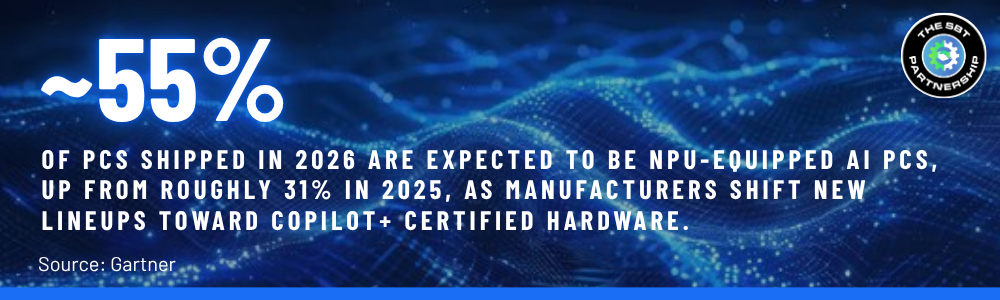
Copilot+ PCs launched as a fairly small slice of the market in 2024, but that’s changing quickly. PC makers have shifted the bulk of their new business laptop lineups toward Copilot+ certified chips, which means fewer non-certified options will be available at all within a couple of refresh cycles. That’s not a reason to panic-buy, but it is a reason to factor Copilot+ into any hardware purchase you’re already planning rather than treating it as a separate, optional line item.
Copilot+ PC adoption stat

Does Your Business Actually Need One Yet?

Not every seat needs to be Copilot+ on day one. The honest answer usually comes down to how a specific role works, not a blanket policy for the whole company.
Probably Fine to Wait
• Desk-based roles running standard office apps
• Current machine is under 3 years old and runs Windows 11 fine
• No regular need for live translation, transcription, or heavy video editing
• No plan yet from Microsoft or leadership to standardize on Recall or Copilot features
Worth Prioritizing Now
• Mobile, field, or hybrid workers who need all-day battery without a charger
• Roles handling sensitive data where on-device processing matters
• Teams doing frequent multilingual calls or meeting transcription
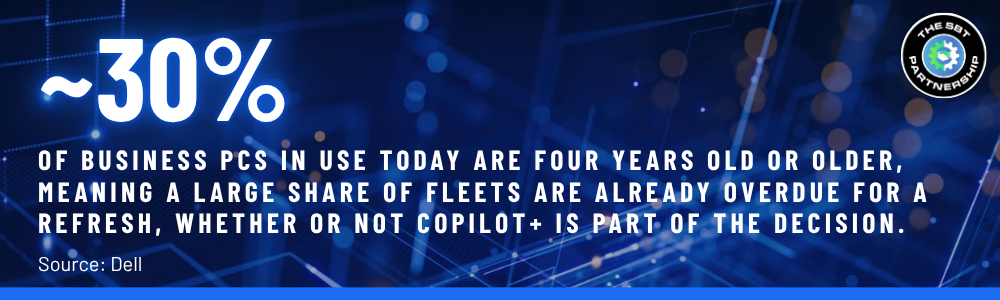
• A machine that's already at or past its 4-year refresh point anyway
In practice, the two lists overlap more than you'd expect. If a device is already due for replacement, the small premium for Copilot+ specs is usually easy to justify. If it isn't, there's rarely a reason to rush the whole fleet just to chase a feature set most roles won't touch.
Either way, this is a purchasing decision worth planning rather than reacting to. Mapping out which roles genuinely need Copilot+ hardware now, which can ride out their current machines a while longer, and how that lines up with your existing refresh schedule turns a confusing spec sheet into a straightforward budget conversation.
Related Read: Procurement as a Service: A Practical Guide for Growing Businesses →

The Short Version

“Copilot” is software. “Copilot+ PC” is a hardware category with a hard line at 40 TOPS, 16GB of RAM, and 256GB of storage. Cross that line, and a machine unlocks on-device AI features that a regular PC simply can’t run, no matter how new the software is.

Whether that matters for your business depends less on the spec sheet and more on how your team actually works day to day, and how close your current fleet already is to needing a refresh.

The good news is that this isn’t a decision you have to make all at once, or get perfectly right on the first try. Most businesses land here gradually, replacing machines as they age out and simply making sure Copilot+ specs are on the checklist when a device is already up for replacement.

SBT Partners

Not Sure If Your Fleet Needs Copilot+ Yet?

We'll help you map which roles actually benefit, and build a refresh plan that fits your budget and timeline.

GET A FLEET REFRESH ASSESSMENT→

Share This Post

  • Share on Facebook
  • Share on X
  • Share on WhatsApp
  • Share on Pinterest
  • Share on LinkedIn
  • Share on Tumblr
  • Share on Vk
  • Share on Reddit
  • Share by Mail

More Like This

What Is a Copilot+ PC?

AI
Copilot+ PC and a regular PC share a name but little else. This guide breaks down the real hardware differences, which AI features only work on certified devices, and whether your business needs one now or can wait.
September 3, 2026
https://www.sbtpartners.com/wp-content/uploads/2026/09/Designer-41.jpg 1024 1536 [email protected] /wp-content/uploads/2023/11/SBT-Logo-Color_a3b47f75244ae0f19b0c6e42706a26e8-1.png [email protected]2026-09-03 14:27:042026-09-03 14:27:11What Is a Copilot+ PC?
Copilot agent reaching for copilot logo

How to Build an AI Agent in 10 Minutes or Less with Microsoft Copilot

AI, Office 365
Learn how to build a simple AI agent in 10 minutes or less using Microsoft Copilot. No coding required. Perfect for SMBs looking to automate fast.
February 20, 2026
https://www.sbtpartners.com/wp-content/uploads/2026/02/Untitled-3-26.png 660 796 [email protected] /wp-content/uploads/2023/11/SBT-Logo-Color_a3b47f75244ae0f19b0c6e42706a26e8-1.png [email protected]2026-02-20 08:44:512026-07-12 13:58:41How to Build an AI Agent in 10 Minutes or Less with Microsoft Copilot
copilot keyboard key

Copilot Business: Microsoft’s Commitment to Small Business Success

AI
Learn how Microsoft 365 Copilot Business helps SMBs boost productivity with AI-powered tools and smart automation.
December 5, 2025
https://www.sbtpartners.com/wp-content/uploads/2025/12/Untitled-5.png 500 500 [email protected] /wp-content/uploads/2023/11/SBT-Logo-Color_a3b47f75244ae0f19b0c6e42706a26e8-1.png [email protected]2025-12-05 15:22:162026-07-12 13:58:46Copilot Business: Microsoft’s Commitment to Small Business Success
The implementation of AI Agents

The Rise of AI Agents

AI
Autonomous AI tools are transforming how companies work, collaborate, and scale. This guide helps you decide which platform fits your needs.
November 6, 2025
https://www.sbtpartners.com/wp-content/uploads/2025/10/AI-agents.jpg 900 1400 [email protected] /wp-content/uploads/2023/11/SBT-Logo-Color_a3b47f75244ae0f19b0c6e42706a26e8-1.png [email protected]2025-11-06 10:20:282026-07-12 13:58:47The Rise of AI Agents
Co-working Business Team Consulting meeting Planning Strategy

AI in Business: Key Applications You Need to Know

AI
Discover how AI in business is transforming industries and solving challenges. Discover all its applications, from automating tasks to enhancing UX.
December 3, 2024
https://www.sbtpartners.com/wp-content/uploads/2024/12/Co-working-Business-Team-Consulting-meeting-Planning-Strategy.jpg 1250 2000 Abstrakt Marketing /wp-content/uploads/2023/11/SBT-Logo-Color_a3b47f75244ae0f19b0c6e42706a26e8-1.png Abstrakt Marketing2024-12-03 16:08:562026-06-25 13:59:01AI in Business: Key Applications You Need to Know
Everything You Need to Know About CoPilot+ PCs

Everything You Need to Know About Microsoft CoPilot+ PC

AI
Discover the next generation of AI-powered PCs with Microsoft’s CoPilot+ PCs and discover how they can enhance your business’s productivity.
November 18, 2024
https://www.sbtpartners.com/wp-content/uploads/2024/11/Everything-You-Need-to-Know-About-CoPilot-PCs.jpg 1250 2000 Abstrakt Marketing /wp-content/uploads/2023/11/SBT-Logo-Color_a3b47f75244ae0f19b0c6e42706a26e8-1.png Abstrakt Marketing2024-11-18 16:43:292026-06-25 13:59:02Everything You Need to Know About Microsoft CoPilot+ PC
How to Integrate AI Into Your Business Strategy

How to Integrate AI Into Your Business Strategy

AI
Want to leverage AI in your business? Discover how to integrate AI into your business strategy in this blog.
November 18, 2024
https://www.sbtpartners.com/wp-content/uploads/2024/11/How-to-Integrate-AI-Into-Your-Business-Strategy.jpg 1250 2000 Abstrakt Marketing /wp-content/uploads/2023/11/SBT-Logo-Color_a3b47f75244ae0f19b0c6e42706a26e8-1.png Abstrakt Marketing2024-11-18 13:36:192026-06-25 13:59:02How to Integrate AI Into Your Business Strategy
Side view of someone typing on laptop computer

How AI and Automation Is Revolutionizing Retail and E-Commerce

AI
Explore how artificial intelligence (AI) in the workplace is revolutionizing various industries and how your business can benefit in this blog.
September 10, 2024
https://www.sbtpartners.com/wp-content/uploads/2024/09/Side-view-of-someone-typing-on-laptop-computer.jpg 1250 2000 Abstrakt Marketing /wp-content/uploads/2023/11/SBT-Logo-Color_a3b47f75244ae0f19b0c6e42706a26e8-1.png Abstrakt Marketing2024-09-10 12:08:442026-06-25 13:59:05How AI and Automation Is Revolutionizing Retail and E-Commerce
Front view of a man interacting with invisible interface with AI graphics on it

Decoding AI for SMBs: How AI Can Enhance Your Operations

AI
Discover how small and medium-sized businesses can decode AI to enhance disaster recovery solutions, streamline operations, and more.
September 10, 2024
https://www.sbtpartners.com/wp-content/uploads/2024/09/Front-view-of-a-man-interacting-with-invisible-interface-with-AI-graphics-on-it.jpg 1250 2000 Abstrakt Marketing /wp-content/uploads/2023/11/SBT-Logo-Color_a3b47f75244ae0f19b0c6e42706a26e8-1.png Abstrakt Marketing2024-09-10 11:59:002026-06-25 13:59:05Decoding AI for SMBs: How AI Can Enhance Your Operations
Previous Previous Previous Next Next Next

Categories

  • AI
  • Cloud Computing
  • Cloud Solutions
  • Copilot
  • Cybersecurity
  • Data Backup
  • Help Desk
  • InTune
  • IT Roadmap
  • Managed IT
  • Managed Services
  • Miscellaneous
  • Modern Workplace
  • News
  • Office 365
  • SharePoint
  • Technology as a Service
  • The IT Strategy Committee
  • The SBT Partnership
  • Total IT Management

Contact Us

"*" indicates required fields

This field is for validation purposes and should be left unchanged.

What We Do

AI Solutions

Helpdesk

Cybersecurity

Microsoft 365

Virtual CIO

Collaboration

Data Backup

Business Continuity

Modern Cloud Services

Infrastructure & Endpoint Management

The SBT Partnership

SBT Solution Stack

The Modern Workplace

Technology as a Service

Procurement as a Service

IT Strategy Committee

SBT Partnership Rewards

About Us

Locations

Contact Us

Charlotte
1619 Providence Road S, Suite 220-135
Marvin, NC 28173

(704) 626 1001

Detroit
143 Cadycentre, Suite 166,
Northville, MI 48167

(313) 251 4031

Website by Abstrakt Marketing Group ©
  • Privacy Policy
  • Sitemap
  • Linkedin
  • YouTube
Scroll to top Scroll to top Scroll to top

This site uses cookies. By continuing to browse the site, you are agreeing to our use of cookies.

AcceptLearn more

Cookie and Privacy Settings


How we use cookies

We may request cookies to be set on your device. We use cookies to let us know when you visit our websites, how you interact with us, to enrich your user experience, and to customize your relationship with our website.

Click on the different category headings to find out more. You can also change some of your preferences. Note that blocking some types of cookies may impact your experience on our websites and the services we are able to offer.

Essential Website Cookies

These cookies are strictly necessary to provide you with services available through our website and to use some of its features.

Because these cookies are strictly necessary to deliver the website, refusing them will have impact how our site functions. You always can block or delete cookies by changing your browser settings and force blocking all cookies on this website. But this will always prompt you to accept/refuse cookies when revisiting our site.

We fully respect if you want to refuse cookies but to avoid asking you again and again kindly allow us to store a cookie for that. You are free to opt out any time or opt in for other cookies to get a better experience. If you refuse cookies we will remove all set cookies in our domain.

We provide you with a list of stored cookies on your computer in our domain so you can check what we stored. Due to security reasons we are not able to show or modify cookies from other domains. You can check these in your browser security settings.

Other external services

We also use different external services like Google Webfonts, Google Maps, and external Video providers. Since these providers may collect personal data like your IP address we allow you to block them here. Please be aware that this might heavily reduce the functionality and appearance of our site. Changes will take effect once you reload the page.

Google Webfont Settings:

Google Map Settings:

Google reCaptcha Settings:

Vimeo and Youtube video embeds:

Accept settingsHide notification only
  • Quick Quote
  • Speak to an Expert
  • Remote Support