Business Continuity Planning for SMBs:
A Practical Starting Checklist
“We have backups” is usually where continuity planning stops for most SMBs. Here’s the next step: a real, no-fluff checklist for building a plan that goes further than that.

“We have backups” is the answer most SMB owners give when asked about business continuity, and it’s usually where the conversation stops. Backups are one piece of a much bigger picture. A real continuity plan covers what happens to your systems, your people, and your customers in the hours and days after something goes wrong, not just whether a file can be restored.
That gap between “we have backups” and “we have a plan” is exactly where most small businesses get caught off guard. The good news is that closing it doesn’t require a consultant or a six-figure project. It requires five specific pieces, documented once and reviewed on a schedule.
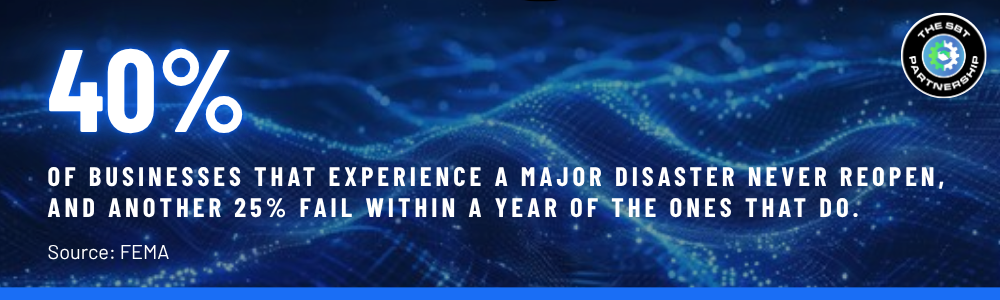
Business continuity planning is broader than disaster recovery, and disaster recovery is broader than backups. Backups answer one question: can we get our data back? Continuity planning answers a longer list: which systems does the business actually depend on, how fast do we need each one back online, who does what when something breaks, how do we tell customers and staff what’s happening, and who’s responsible for making sure any of this still works next year.
Skipping straight to backups is understandable. It’s the most tangible piece, the one vendors sell, and the one that shows up on an invoice. But a business can have flawless backups and still lose a week of operations because nobody knew who was supposed to restore what, in what order, or how to tell clients the phones were down in the meantime.
These five pieces make up a workable first-draft continuity plan. None of them require new software. All of them require someone to actually sit down and write it out.
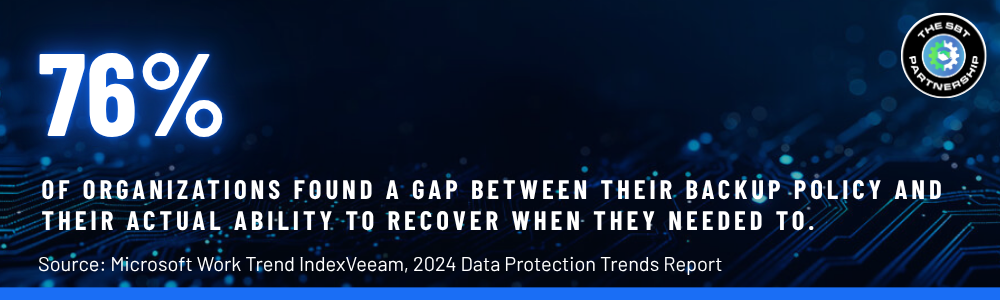
The checklist above isn’t just good practice, it addresses a documented gap. Continuity planning tends to track company size almost exactly, which means smaller businesses are consistently the least prepared for the disruptions that hit them just as hard as anyone else.
Bigger companies aren’t smarter about this, they just have someone whose job includes writing it down and revisiting it. That’s the real difference between the 30% and the 73%: not budget, not sophistication, just whether continuity planning has an owner. An SMB doesn’t need to hire for that role. It needs the five-item list above, about an afternoon to draft the first version, and a standing process that keeps someone accountable for reviewing it.
None of this has to be perfect on the first pass. A documented, imperfect plan that covers systems, testing, communication, roles, and review beats a polished backup solution with nothing written down around it. The businesses that recover quickly aren’t the ones with the most expensive tools, they’re the ones who already know what to do before anything breaks.
A continuity plan that lives in a folder from the day it was written is already a step behind. Systems change, vendors change, staff turn over, and a plan built around last year’s tech stack can quietly stop matching how the business actually runs. Someone has to own the review, not just the first draft.
That ownership is exactly what SBT’s IT Strategy Committee is built to provide. Rather than treating continuity planning as a one-time project, the Committee builds it into a recurring cadence of reviews and planning sessions, alongside the rest of your technology roadmap, so the plan gets revisited on a schedule instead of after something already went wrong.
 https://www.sbtpartners.com/wp-content/uploads/2026/09/Designer-43.jpg
1024
1536
[email protected]
/wp-content/uploads/2023/11/SBT-Logo-Color_a3b47f75244ae0f19b0c6e42706a26e8-1.png
[email protected]2026-09-10 14:06:352026-09-10 15:32:10What Industries Are the Most Vulnerable to Cyber Attacks?
https://www.sbtpartners.com/wp-content/uploads/2026/09/Designer-43.jpg
1024
1536
[email protected]
/wp-content/uploads/2023/11/SBT-Logo-Color_a3b47f75244ae0f19b0c6e42706a26e8-1.png
[email protected]2026-09-10 14:06:352026-09-10 15:32:10What Industries Are the Most Vulnerable to Cyber Attacks? https://www.sbtpartners.com/wp-content/uploads/2026/08/Designer-39.png
1024
1536
[email protected]
/wp-content/uploads/2023/11/SBT-Logo-Color_a3b47f75244ae0f19b0c6e42706a26e8-1.png
[email protected]2026-08-20 14:40:402026-08-20 14:41:42The Real Cost of a Data Breach for a Small Business
https://www.sbtpartners.com/wp-content/uploads/2026/08/Designer-39.png
1024
1536
[email protected]
/wp-content/uploads/2023/11/SBT-Logo-Color_a3b47f75244ae0f19b0c6e42706a26e8-1.png
[email protected]2026-08-20 14:40:402026-08-20 14:41:42The Real Cost of a Data Breach for a Small Business https://www.sbtpartners.com/wp-content/uploads/2026/08/1726750210_img-darkweb.webp
613
871
[email protected]
/wp-content/uploads/2023/11/SBT-Logo-Color_a3b47f75244ae0f19b0c6e42706a26e8-1.png
[email protected]2026-08-12 14:20:132026-08-14 20:52:58The Dark Web: One Leaked Password Is All It Takes
https://www.sbtpartners.com/wp-content/uploads/2026/08/1726750210_img-darkweb.webp
613
871
[email protected]
/wp-content/uploads/2023/11/SBT-Logo-Color_a3b47f75244ae0f19b0c6e42706a26e8-1.png
[email protected]2026-08-12 14:20:132026-08-14 20:52:58The Dark Web: One Leaked Password Is All It Takes https://www.sbtpartners.com/wp-content/uploads/2026/04/GettyImages-1348795158-cyber-security.webp
194
345
[email protected]
/wp-content/uploads/2023/11/SBT-Logo-Color_a3b47f75244ae0f19b0c6e42706a26e8-1.png
[email protected]2026-04-23 10:55:062026-07-14 13:59:22You Have Security Tools. But Do You Have a Security Plan?
https://www.sbtpartners.com/wp-content/uploads/2026/04/GettyImages-1348795158-cyber-security.webp
194
345
[email protected]
/wp-content/uploads/2023/11/SBT-Logo-Color_a3b47f75244ae0f19b0c6e42706a26e8-1.png
[email protected]2026-04-23 10:55:062026-07-14 13:59:22You Have Security Tools. But Do You Have a Security Plan? https://www.sbtpartners.com/wp-content/uploads/2026/04/Phishing.jpg
485
913
[email protected]
/wp-content/uploads/2023/11/SBT-Logo-Color_a3b47f75244ae0f19b0c6e42706a26e8-1.png
[email protected]2026-04-02 16:16:462026-07-12 13:58:37How Modern Phishing Bypasses Traditional Email Filters
https://www.sbtpartners.com/wp-content/uploads/2026/04/Phishing.jpg
485
913
[email protected]
/wp-content/uploads/2023/11/SBT-Logo-Color_a3b47f75244ae0f19b0c6e42706a26e8-1.png
[email protected]2026-04-02 16:16:462026-07-12 13:58:37How Modern Phishing Bypasses Traditional Email Filters https://www.sbtpartners.com/wp-content/uploads/2026/03/ios.png
907
1617
[email protected]
/wp-content/uploads/2023/11/SBT-Logo-Color_a3b47f75244ae0f19b0c6e42706a26e8-1.png
[email protected]2026-03-26 10:50:422026-07-12 13:58:37Why iPhone Updates Matter More Than Ever
https://www.sbtpartners.com/wp-content/uploads/2026/03/ios.png
907
1617
[email protected]
/wp-content/uploads/2023/11/SBT-Logo-Color_a3b47f75244ae0f19b0c6e42706a26e8-1.png
[email protected]2026-03-26 10:50:422026-07-12 13:58:37Why iPhone Updates Matter More Than Ever https://www.sbtpartners.com/wp-content/uploads/2026/02/Untitled-29.png
1080
1080
[email protected]
/wp-content/uploads/2023/11/SBT-Logo-Color_a3b47f75244ae0f19b0c6e42706a26e8-1.png
[email protected]2026-02-27 09:50:252026-07-12 13:58:40The SMB Owner’s Guide to Fewer Tech Headaches
https://www.sbtpartners.com/wp-content/uploads/2026/02/Untitled-29.png
1080
1080
[email protected]
/wp-content/uploads/2023/11/SBT-Logo-Color_a3b47f75244ae0f19b0c6e42706a26e8-1.png
[email protected]2026-02-27 09:50:252026-07-12 13:58:40The SMB Owner’s Guide to Fewer Tech Headaches https://www.sbtpartners.com/wp-content/uploads/2025/11/Screenshot-2025-11-14-114035-1.png
1274
1562
[email protected]
/wp-content/uploads/2023/11/SBT-Logo-Color_a3b47f75244ae0f19b0c6e42706a26e8-1.png
[email protected]2025-11-17 10:14:592026-07-12 13:58:47Cyber Hygiene in 2026
https://www.sbtpartners.com/wp-content/uploads/2025/11/Screenshot-2025-11-14-114035-1.png
1274
1562
[email protected]
/wp-content/uploads/2023/11/SBT-Logo-Color_a3b47f75244ae0f19b0c6e42706a26e8-1.png
[email protected]2025-11-17 10:14:592026-07-12 13:58:47Cyber Hygiene in 2026 https://www.sbtpartners.com/wp-content/uploads/2025/05/ReCAPTCHA-and-Malware-What-You-Need-to-Know.jpg
1250
2000
Abstrakt Marketing
/wp-content/uploads/2023/11/SBT-Logo-Color_a3b47f75244ae0f19b0c6e42706a26e8-1.png
Abstrakt Marketing2025-05-12 08:52:232026-07-12 13:58:57ReCAPTCHA and Malware: What You Need to Know
https://www.sbtpartners.com/wp-content/uploads/2025/05/ReCAPTCHA-and-Malware-What-You-Need-to-Know.jpg
1250
2000
Abstrakt Marketing
/wp-content/uploads/2023/11/SBT-Logo-Color_a3b47f75244ae0f19b0c6e42706a26e8-1.png
Abstrakt Marketing2025-05-12 08:52:232026-07-12 13:58:57ReCAPTCHA and Malware: What You Need to Know